Omni Print
Direct Printing from Odoo
Print reports, labels (ZPL), and POS receipts to any printer on Desktop & Android — no downloads needed.
How It Works
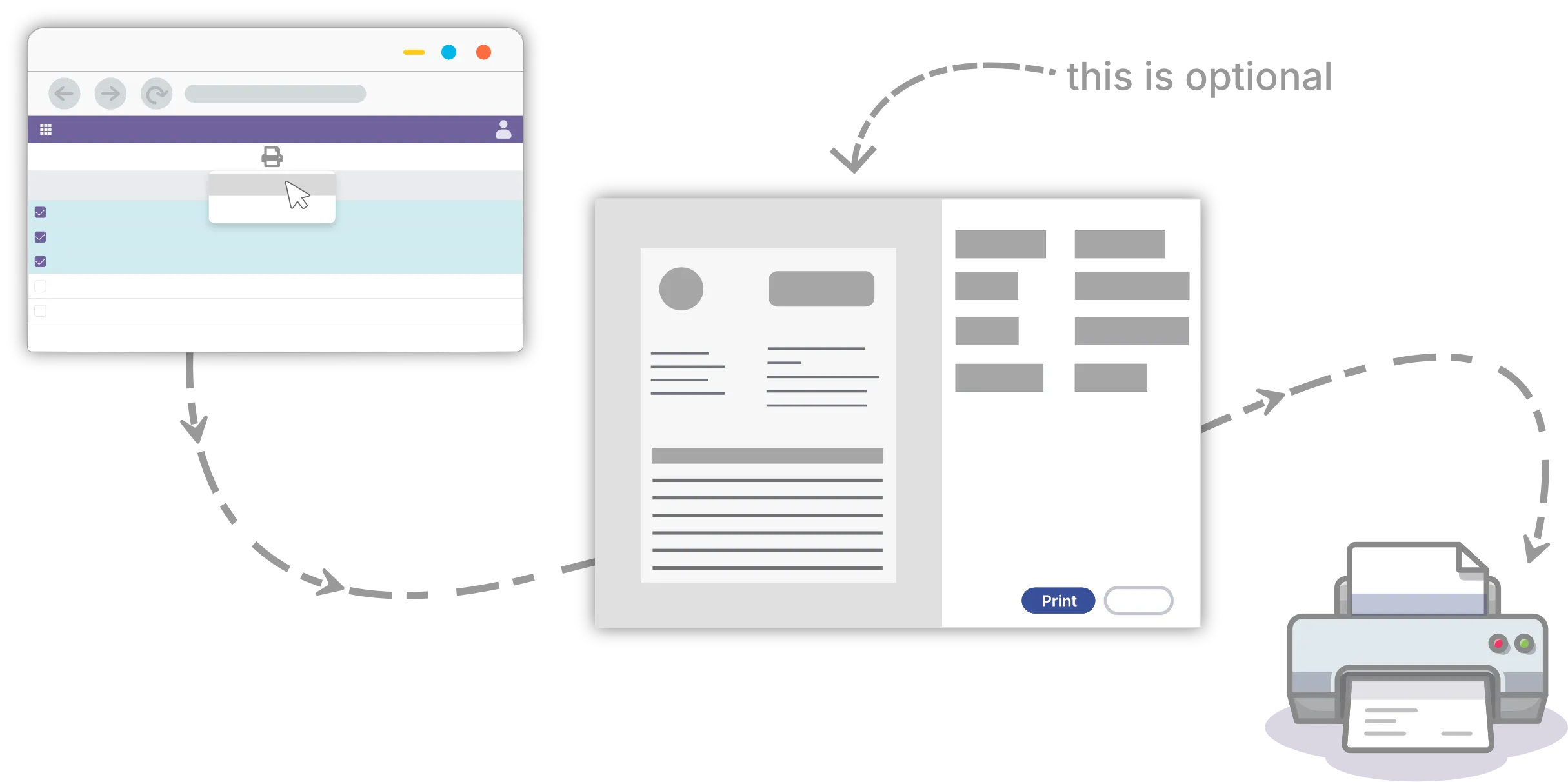
Omni Print includes an Odoo addon and a Client-side App. The Odoo addon captures the report and sends files to the client-side app, which then prints them.
Features
Everything you need for seamless printing from Odoo
One-click Printing
Send documents to any configured printer with just a single click. No complex setup required.
Various Printers
Supports cable-connected and network printers. Full support for ZPL and ESC/POS thermal printers.
No Printing Limits
Single upfront payment, no subscription required. Print as many sheets as you need with no restrictions.
Cross-Platform
Supports Windows, macOS, Linux, and Android. Quickly install and configure with minimal effort.
Android Support
Automatic discovery of network and Bluetooth printers. Built-in barcode scanning for mobile workflow.
Getting Started
Start printing from Odoo in just a few steps
Install Odoo addons and apps
See the Downloads section to install the Odoo addon(s) and the Omni Print app on your desktop or Android device.
Connect your printers
Use the desktop or Android app to discover and add Wi-Fi, Bluetooth, and receipt printers.
Print from Odoo
In Odoo, open a document or POS order and click Print, then choose your printer if prompted.
Done in one click
Future prints go directly to your default printer—no more PDF downloads.
Need more details? Check the Omni Print documentation for setup guides.
Download
Desktop (Windows, macOS, Linux) and Android apps · 14-day free trial

Pricing
Pay once, use forever. No subscriptions, no recurring fees.
Limited-time promotion: Omni Print lifetime licenses are currently free. Pricing may change in the future.
/ device $0 / device
$5-
Unlimited 14-day free trial
-
Lifetime license
-
Unlimited printers
-
1 year updates & support
Use discount code BLACK25 to get 100% off.
After purchase, you will receive an email containing your License Key.
FAQ
Common questions about Omni Print
Omni Print is a print delegate solution for Odoo, enhancing printing capabilities. It includes an Odoo addon and a client-side app. The addon captures print jobs (optionally rendering PDFs on the client-side for faster performance) and sends them to the client-side app, which directs them to your chosen printer.
Yes, the client-side app handles the direct communication with your printers. Installing it on your PC (Windows, macOS, or Linux) is required for Omni Print to function.
The client-side app currently supports Windows 10/11, macOS, Linux, and Android (Beta).
Omni Print automatically discovers printers configured in your operating system. Simply add your printer (USB or network) to your OS, and Omni Print will be able to use it. No special driver installation within Omni Print is needed.
Omni Print works with most standard printers (cable-connected or network) recognized by your OS. It also specifically supports thermal label printers using the ZPL protocol and receipt printers using the ESC/POS protocol (compatible with Odoo PoS). Note: The Android Beta version currently supports Network/Bluetooth printers but does not yet support USB or ZPL label printing.
Omni Print utilizes client-side PDF rendering using the efficient `libwkhtmltox` engine. This can speed up report generation significantly (up to 50% faster) compared to server-side rendering by leveraging your computer's resources and caching fonts/styles locally.
No, Omni Print is available with a single upfront payment. There are no recurring subscription fees, and you get unlimited print quotas.
Pricing is based on the number of devices (PC or Android) running Omni Print, not the number of printers. One license per device, unlimited printers per device.
After purchase, you will receive an email containing your License Key.
Chrome 142+ may block cross-origin requests from the Odoo page to localhost (where the Omni Print client runs). Allow these local requests by visiting chrome://flags/#local-network-access-check and disabling the local network access check, then restart the browser.